 PPTF
PPTFTradingView in prop trading: an external chart
TradingView prop trading is not a firm's platform but an external chart from which some programmes allow orders to be sent. We work out what that gives you when changing firm and where the link breaks down.
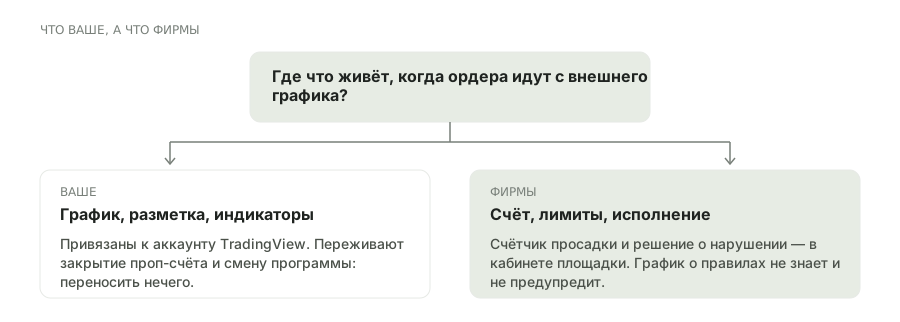
What is on whose side here
The link works like this: the chart, the markup and the indicators live in your TradingView account, while the account, the limits and the execution live at the prop firm. The order button simply passes the request to its engine.
Hence the main advantage that none of the previous environments has: when you change programme there is nothing to move. The markup, the templates and the scripts stay where they are, and only the connected account changes. For anyone taking challenges at several firms that saves weeks of setup.
- What is yours stays yours
- Markup, templates and Pine indicators are tied to the TradingView account rather than to the account you trade. Closing a prop account does not touch them.
- The firm counts the rules
- The limits, the drawdown counter and closing the account are on the engine's side. TradingView knows nothing about the rules and will give no warning.
- The link does not exist everywhere
- Sending orders works only where the firm has built the integration. That is exactly what sets prop firms with TradingView apart: having the chart means nothing in itself.
Trading from a TradingView chart: where the link breaks down
Three limitations that make TradingView worth treating as a convenient addition rather than the only interface to a prop account.
How to use it on a prop account
The sensible scenario is to split the roles: analysis on TradingView, control of the limits in the firm's client area.
Levels, templates and indicators are better kept here: they will outlive any change of programme and will not be lost when an account closes.
the strong pointOpen the firm's client area as a second window. The only source of truth on drawdown is its counter, not your chart.
compulsoryThere is no size calculator for the limits in this setup. Work it out in advance and keep the figure in front of you rather than in your head.
before the tradeThe export for reviewing a breach comes from the firm: TradingView has no history of your prop account.
for a disputeFrequently asked questions
Can a prop account be traded through TradingView?
Only if the firm has built an integration: the orders go to its engine while the chart stays external. Having TradingView does not by itself give you that.
Does TradingView see the prop firm's limits?
No. The drawdown counter, the count of trading days and closing the account are on the firm's side. The chart knows nothing about the rules and will not warn you.
Does the markup carry over when I change prop firm?
Yes, and that is the main advantage of the setup: templates, levels and indicators are tied to your account rather than to the trading account. Only the connected account changes.
Do Pine scripts work as advisors?
No. Pine builds indicators and sends alerts, but it does not open a trade itself. Automation requires third-party bridges, and firms usually prohibit them.
Which orders are available through the integration?
Usually market and simple pending ones. Complex conditional constructions may not be passed — the list has to be read in the integration description of the particular programme.
Is a paid TradingView subscription needed?
For the link to an account, not necessarily, but the free plan limits the number of indicators and alerts. It is a question of convenience rather than of access to the prop account.
Where do I get the trade history for a review?
From the firm: the export is produced by its engine. TradingView has no prop account history, only your own chart annotations.
Can several prop accounts be held in one account?
Technically the integration allows it, but firms' rules on several accounts and hedging between them are strict. Rules first, connection second.
Is the data delayed on the free plan?
Data for exchange instruments can be delayed on free plans, while orders go at the firm's quotes. Navigating by the chart price in that situation is dangerous — reconcile with the firm's terminal.
Who does this setup suit best?
People taking challenges at several programmes who do not want to move their markup every time. It suits anyone who wants one screen with trades and limits less well.
Read next
